
Turning ambiguity to actionable UX materials for a Sales Force App
This case study details the discovery, analysis, and proposed design for a critical B2B application used daily by field sales teams to execute in-store tasks and manage their daily sales route.
All proprietary company names and product references have been generalized to maintain confidentiality.

UX Designer
Joined during Discovery Phase & led the definition of user journeys, wireframes, & user flows

UX Materials
The goal was to turn business requirements & operations into actionable UX materials

2024
I joined for 3 months, focusing on Discovery & Research Phase
NDA Protected
This case study is based on the Vinamilk Sales Automation App. Key details have been generalized or anonymized to comply with our Non-Disclosure Agreement. My contributions and the project's measurable outcomes are accurately represented.

Overview
A redesigned experience optimized for speed and accuracy
This initiative focused on redesigning a critical B2B application for Vinamilk’s salesforce: the Sales Automation App (SFA). This tablet app helps users track their performance, provides assistance during and after a sales visit, and plays a key role in tracking B2B orders.
Team scale
3 designers, each taking a different role during Discovery & Research
My role
UX designer
Contribution
Responsible for creating user journey, wireframe, user flows, and usability testing
Challenge
Bridging the sales knowledge gap
As non-sales members, the biggest hurdle was the steep learning curve. We had to quickly master the specific sales terms, critical metrics (KPIs), and operational processes that governed the field salesperson's day.
Based on gathered information & previously defined user personas, I worked with the team to define a comprehensive user journey.
Core User & Entity Definitions
Field Sales Representative (FSR)
An employee responsible for managing a dedicated portfolio of retail accounts. FSRs are organized into territory teams and are delegated to work closely with specific Channel Partners to ensure product availability and retail execution.
Channel Partner / B2B Inventory Hub
An authorized, regionally-organized B2B entity responsible for holding the company's product inventory and executing local product distribution. They serve as the fulfillment and inventory layer between the producer and the retail network.
Retail Outlet
A medium-to-large volume retailer that procures product inventory from the Channel Partner. The Retail Outlet is serviced by a designated FSR, who provides support for trade promotions, product advisory, and logs purchase orders for fulfillment by the Channel Partner.
Daily Call Plan
A structured, supervisor-defined sequence of required daily visits to a set list of Retail Outlets, determined by sales territory and resource capacity. Each visit requires the completion of business-specific mandatory activities (Key Visit Tasks), culminating in the primary goal of Order Capture.
Approach
Look at the problem from both business & users’ POV
From business goals to user realities, our initial focus was on building a shared understanding of the FSR’s world, their incentives, and their daily operational needs.
1/ Gather business context for Main Features
We worked with Product Owner to map out most important business knowledge, including: KPIs (metrics affecting paychecks), Daily Call Plan practicalities (how they are calculated & how business expects FSRs to follow & perform), Key Visit Tasks at outlets....
From which, we drafted a few key features that the MVP should have as the following table:
Main Features
Attendance & shift logging
Allows the FSR to digitally record the start and end of their workday, providing accurate data for field activity management and compliance tracking.
Performance dashboard
A high-level, visualized summary that displays the FSR’s Monthly Performance Indicators (KPIs), such as sales targets, quota attainment, and overall progress against goals.
Call cycle execution & geo-guidance
Presents the FSR with their Daily Call Plan (list of required outlet visits). Features real-time progress tracking (e.g., visited/order logged status) and integrates Geolocation Services for turn-by-turn route suggestions and accurate location verification for movement between outlets.
Key visit tasks (KVT) / Guided selling workflow
A structured, mandatory list of on-site activities presented sequentially at each outlet stop. This ensures compliance with merchandising standards, promotional execution, and provides a structured workflow to maximize sales opportunity capture.
Order capture & management
Facilitates the logging of customer purchase requests. This module distinguishes between On-Route Orders (placed during a scheduled visit) and Ad-Hoc/Off-Route Orders (placed for outlets not on the current day's planned itinerary), ensuring all sales demand is recorded.
Account management & setting
Enables the FSR to view, update, and maintain essential data pertaining to their assigned outlets. Also includes settings for personal app configuration and preferences.
2/ Conduct user surveys for User Personas
Our teammate (shout out to Toàn) conducted user surveys to understand the FSR’s perspective, identifying friction points, pain points, and opportunities for efficiency improvement in their current process.
I summarized and generalized the following personas based on the research insights.
The Experienced Performer

Quach Thi Ngoc Quyen
Age
32
Role
FSR
Experience
10 years
🎯
Goals
- Prioritize achieving KPIs and commission
- Focus on selling products that offer good sales incentives and managing the sales flow for large, long-term accounts.
🥰
Key Needs
- Accurate & timely KPIs data
- Quick data capture (orders, inventory, compliance)
- Reliable syncing and offline capability
😰
Top Pain Points
- Data entry burden: Having to log the same data (inventory, orders) multiple times across different systems/forms
- Lack of real-time data: Inventory/delivery history data is delayed
- Technical issues with current app: GPS check-in/out failures, especially when connectivity is poor
View more
The Newcomer

Nguyen Van Tuan
Age
24
Role
FSR
Experience
1.5 years
🎯
Goals
- Focus on compliance with planned tasks and reporting requirements (daily checks, reports)
- Seek to learn and adhere to all sales processes and maximize daily call volume
🥰
Key Needs
- Clear, guided workflow for all tasks (KVT)
- Visibility into product inventory and promotional details
- Simple, quick entry for orders and post-visit reports
😰
Top Pain Points
- Information overload: Too many mandatory compliance tasks (KVTs) that disrupt sales flow
- Data discrepancy: Inventory/delivery history data isn't always accurate or current on the tablet.
- Technical issues with current app: App is prone to crashing, slow performance, and GPS check-in errors.
View more
Discovery & research
Charting a 3-phase User Journey
From the gathered knowledge, I created a comprehensive, 3-phase user journey to clarify the FSR's emotional state, actions, and UX-focused goals (JTBDs) at every touchpoint.
The Context
Actor
Field Sales Representative (FSR)
Scenario
Executing the daily sequence of mandatory visits to assigned Outlets using the mobile app, with the goal of capturing orders
Expectations
Efficiently complete all scheduled visits, capture maximum order volume, ensure KVT compliance, and finish the day on time with minimal administrative overhead
Journey Phases
A. Planning & start of day
- Log attendance (Check-in)
Arrive at work, open app and clock in
- Review dashboard
Attend daily meeting with their supervisor. Recap on current performance & align on goals.
- View Daily call plan
View their day’s itinerary on the app
B. Visiting Outlets & execute KVTs
- Travel to location
Follow geo-guidance in app to navigate to outlets
- Execute KVTs
Arrive at outlets & execute Key Visit Tasks as guided in the app
- Answer Outlet’s questions
Assist Outlets with promotions & order-related issues
- Capture orders
Use the app to place the right SKU & promotions for outlets
C. Reviewing & closing the day
- Review Daily Summary (Orders placed, visits completed)
View Dashboard for quick performance review
- Log attendance (Check-out)
Clock out at the last Out let stop
View more
Mindset & Emotions
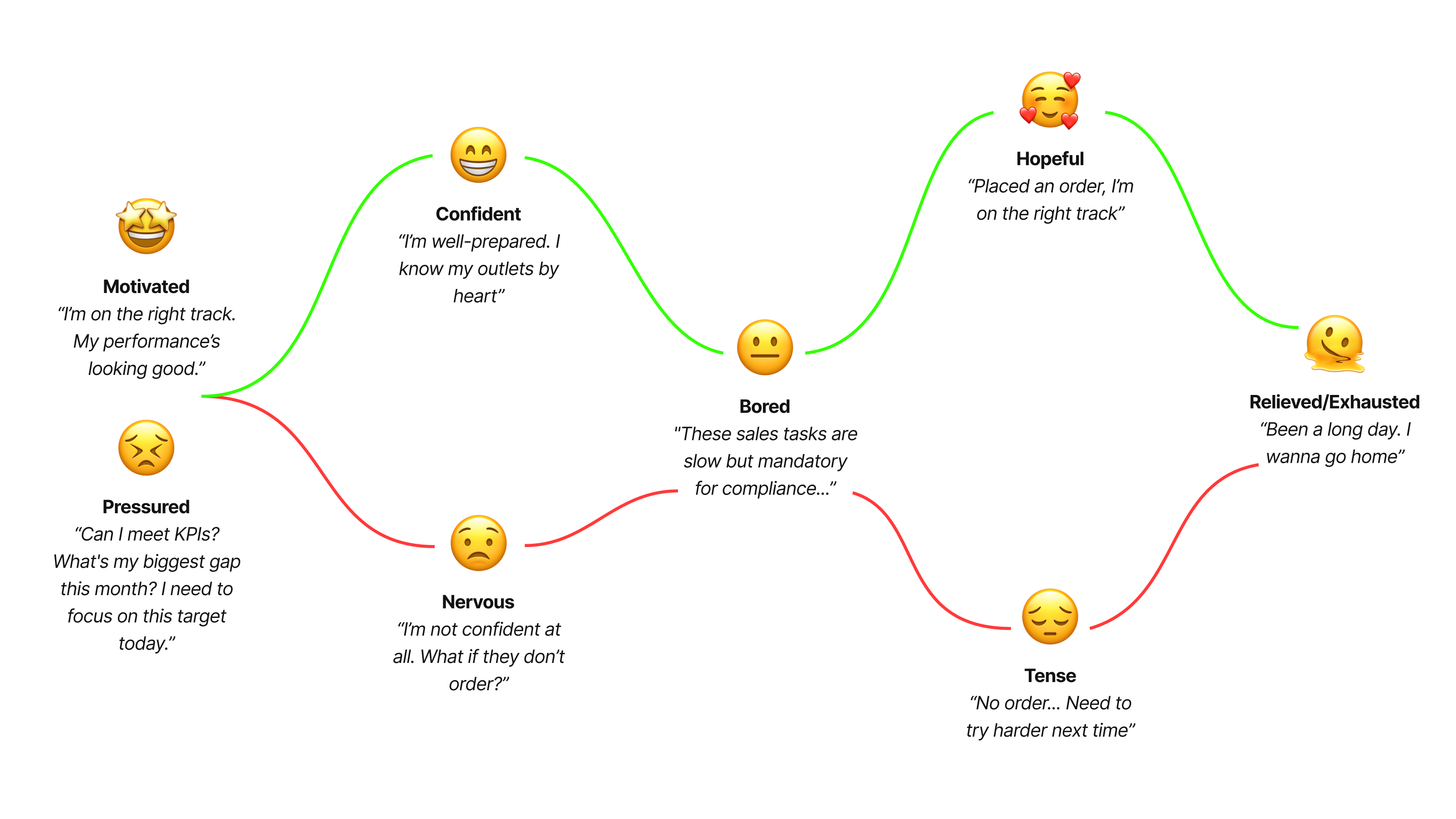
The Insights
Pain points & Opportunities
- Performance data is not available in the (current at the time) app→ O1: Add real-time data to Dashboard
- Geo-guidance is not accurate; call plan still requires manual re-sequencing→ O2: Improve geo-location accuracy & background sync speed
- GPS location accuracy is poor, forcing manual confirmation
- Too many mandatory tasks
- Compliance feels arbitrary
- Performance data is not available in the (current at the time) app→ O1: Add real-time data to Dashboard
Discovery & research
Defining JTBDs 👍
To keep the team focused on desired outcomes, I used JTBDs. JTBDs help shift the focus from ‘who’ the user is or ‘what’ they do, to ‘why’ they are doing it, and ultimately ‘what’ they want to achieve.
JTBDs
A. Planning & start of day
- Log attendance (Check-in)
👍 Check in successfully
- Review dashboard
👍 Know their current performance👍 Align on general goals👍 Know what can be done (overall and today) to meet KPIs
- View Daily call plan
→ Know their current performance
Know what can be done (overall and today) to meet KPIs
Have a good understanding of their retailers
Have a good understanding of SKUs and promotions
B. Visiting Outlets & execute KVTs
- Travel to location
👍 Arrive on time
- Execute KVTs
👍 Carry out each task quickly and successfully with little to no errors👍 Feel focused and guided throughout the process
- Answer Outlet’s questions
👍 Have an information source to refer back to if needed
- Capture orders
👍 See related products and quickly select to create order👍 Create order easily and successfully
C. Reviewing & closing the day
- Review Daily Summary (Orders placed, visits completed)
End the day successfully
→ Know if today’s goals are met
- Log attendance (Check-out)
👍 Check out successfully
Key UX Element
Wireflow as the starting point for design
As non-sales members, the biggest hurdle was the steep learning curve. We had to quickly master the specific sales terms, critical metrics (KPIs), and operational processes that governed the field salesperson's day.
Based on gathered information & previously defined user personas, I worked with the team to define a comprehensive user journey.
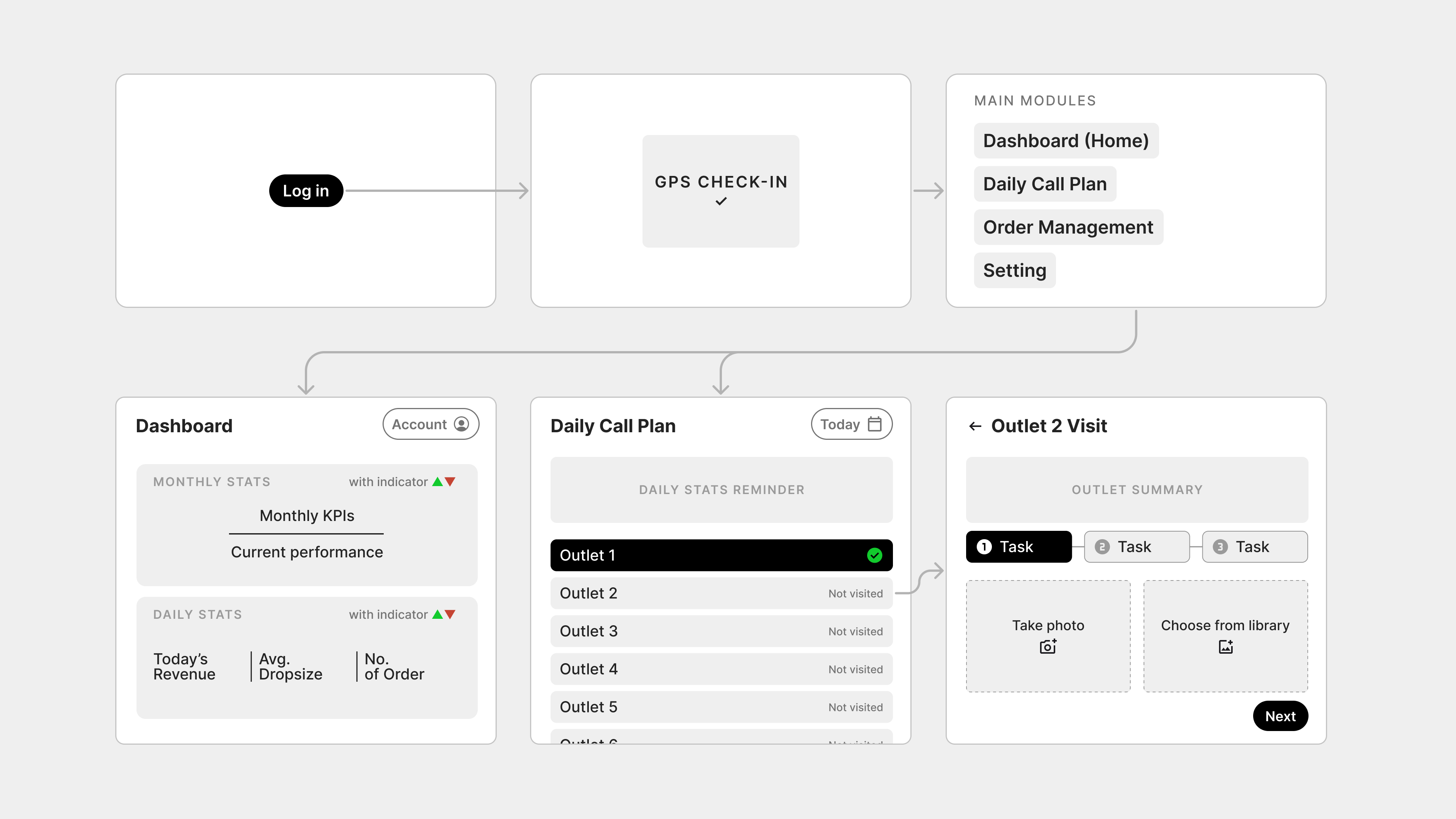
App structure wireflow
Design principles
The 'Why' Behind the Design
This wireframe for the uses several UX rationales, primarily focused on efficiency, task guidance, and motivational data display for the on-the-go Field Sales Representative (FSR).
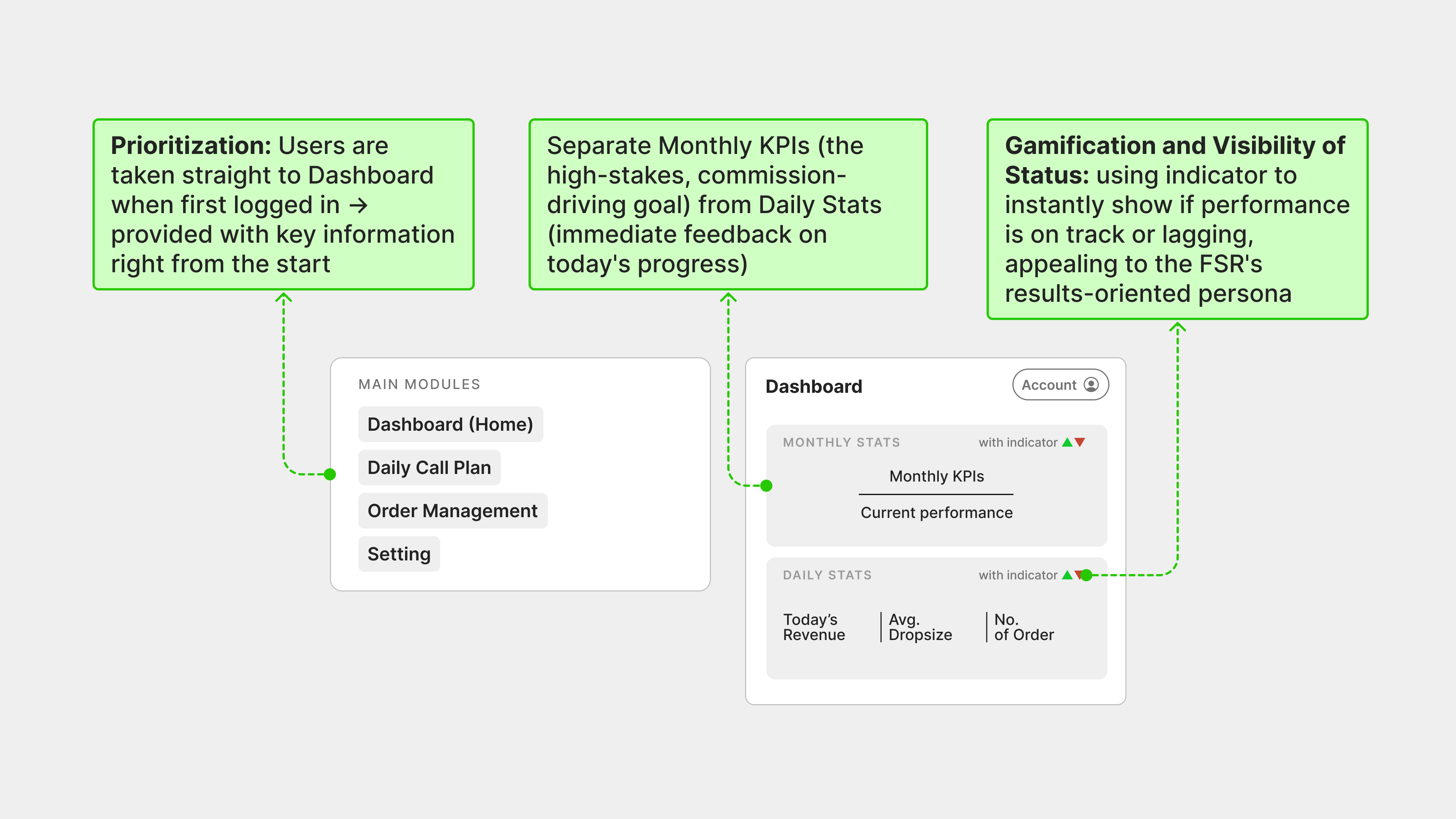
1/ Prioritize and personalize
The FSR's goal in the morning is efficient alignment. The design strictly follows the FSR's required daily workflow, minimizing cognitive load and decision points.

2/ Motivational and goal-oriented dashboard
Displaying key performance indicators (KPIs) upfront motivates the FSR and provides necessary context for daily prioritization
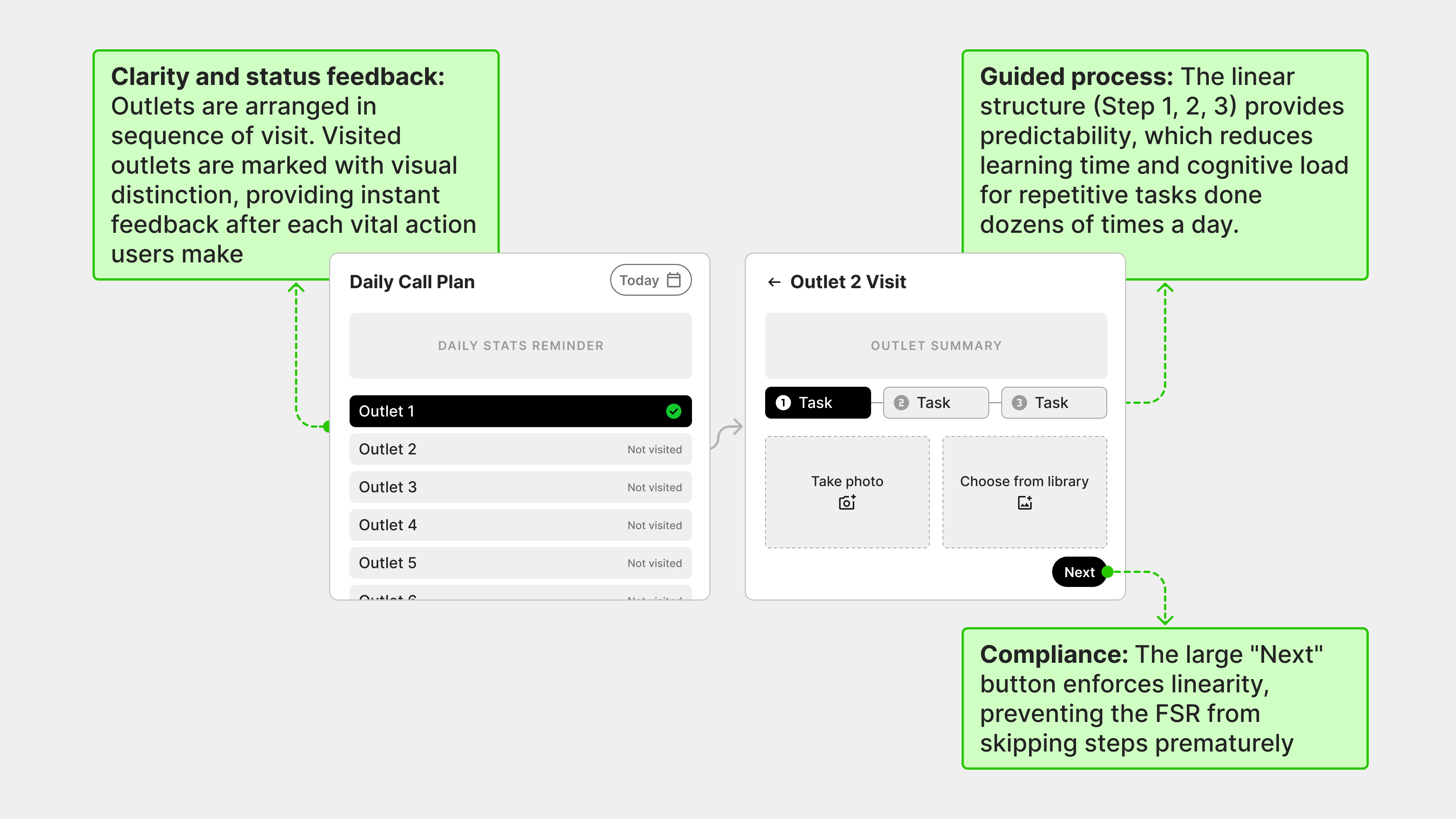
3/ A guided, frictionless workflow
The design ensures the FSR follows the mandated Key Visit Tasks (KVT) workflow, which is critical for compliance and sales effectiveness (as identified in the persona)
Validation
Usability testing with Figma prototype & Maze
Based on the UX materials, we designed key UI flows and create interactive Figma prototypes for user testing. Due to time restriction (we could only test during FSRs’ working hour) and confidentiality reasons, we conducted an in-depth usability testing with 5 FSRs, each taking 1 hour on average to finish.
During the test, each FSR was assisted by one of our team members. We did not intervene during user’s interaction and only provided early guidance, taking note of their interactions, and later on asked a few follow-up questions.
We selected 5 FSRs based on their age & work experience at the company. The test purpose was to validate essential assumptions that the design was based on. Most of the UIs were brand-new and considerably different from the sales app they were using at the time.
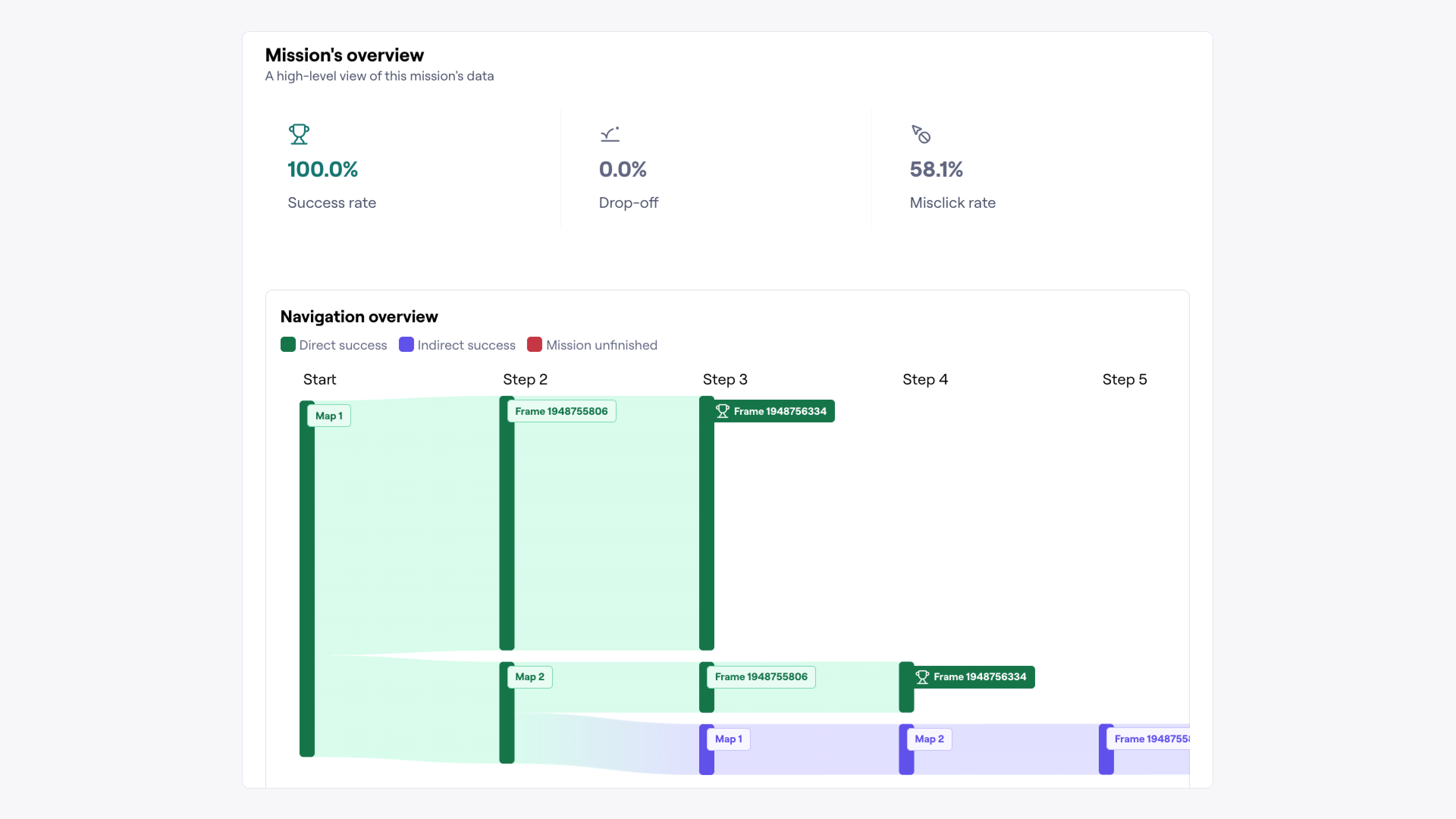
Daily Call Plan: 100% success rate
All FSRs succeeded in navigating Daily Call Plan screen and select the asked Outlet to start a visit.
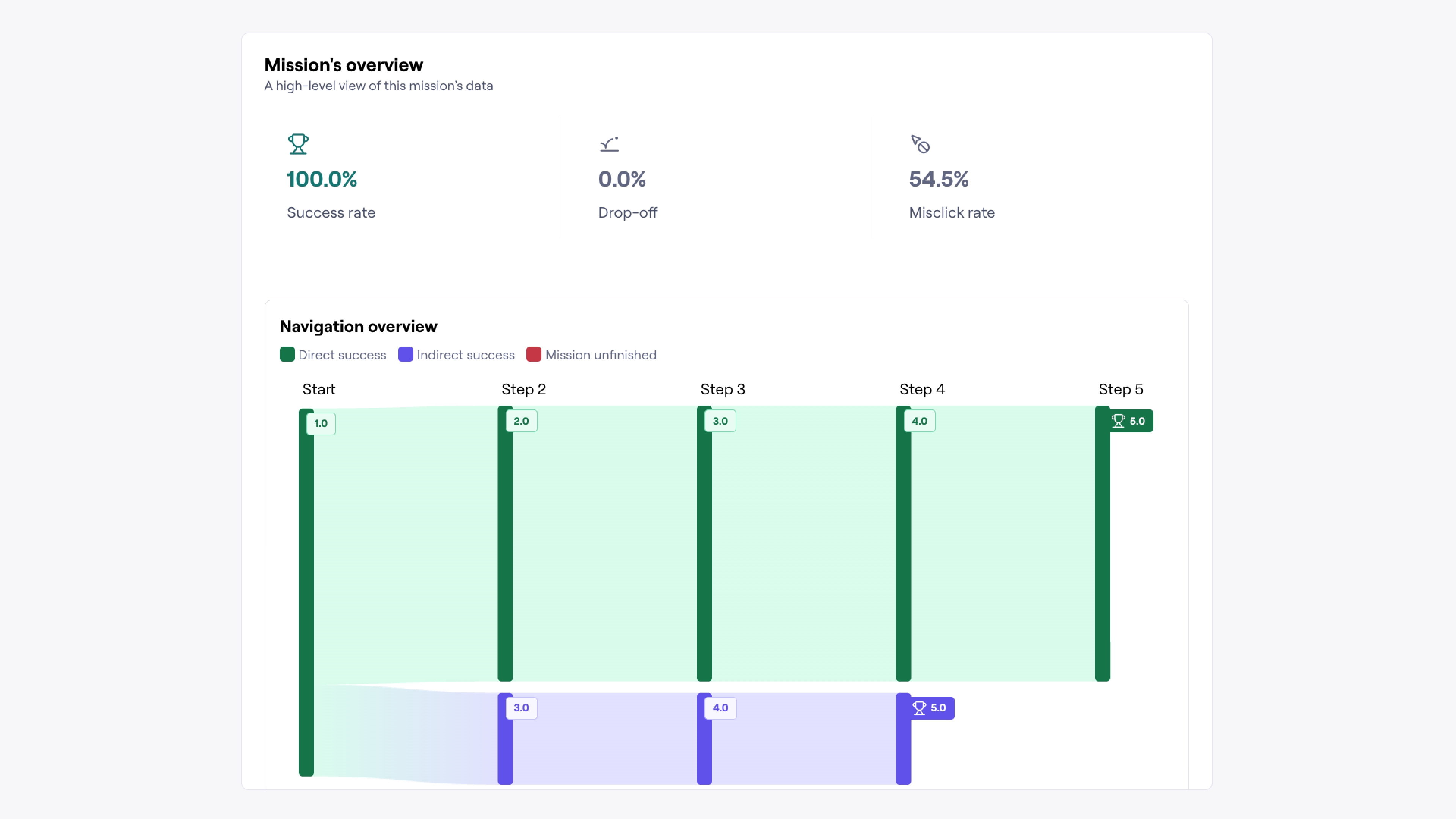
Simple KVTs: 100% success rate
As Key Visit Tasks flow was a newly introduced concept, we decided to test it in 5/7 prototypes. Results showed that the majority of users succeeded in completing required missions.
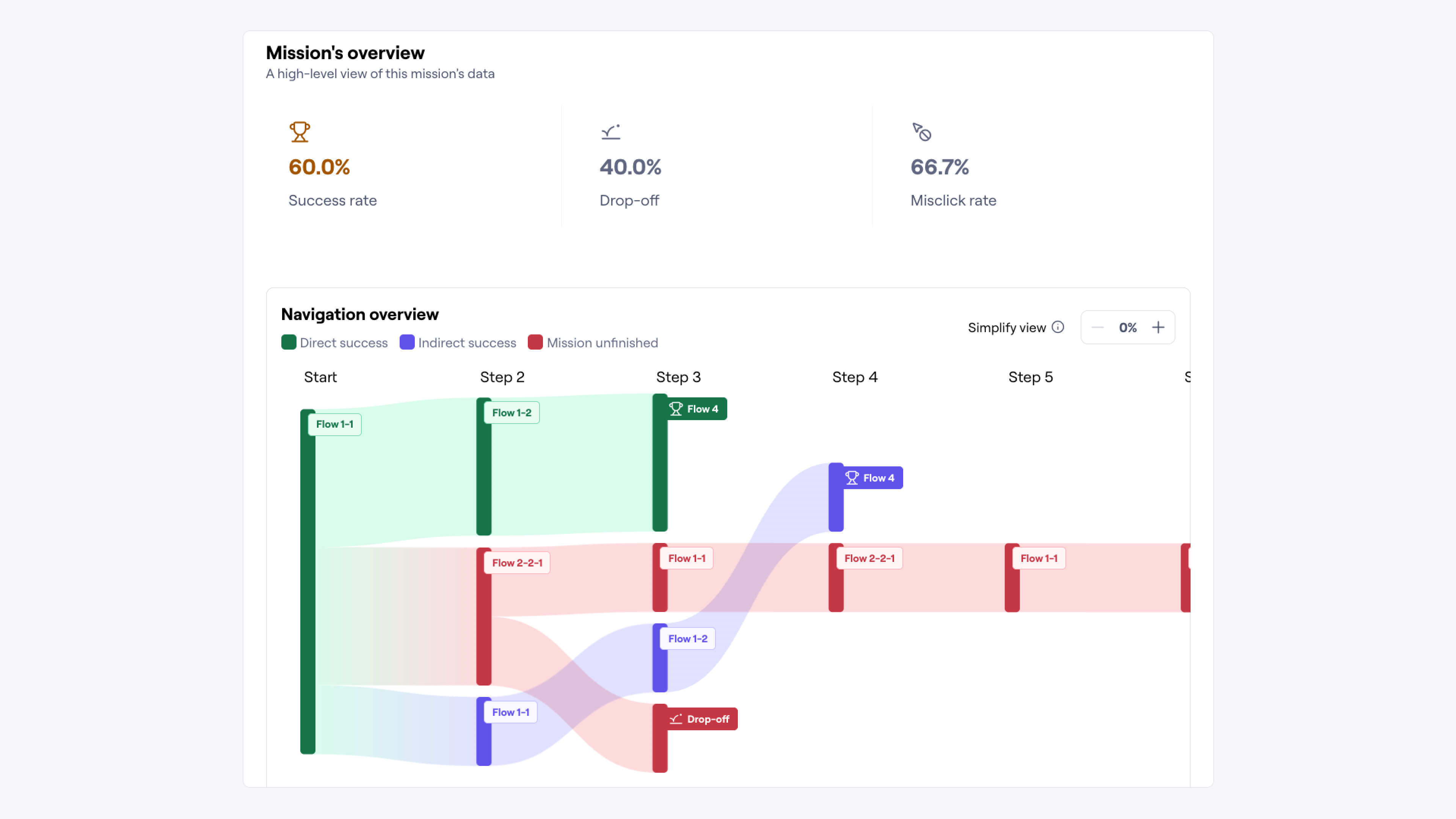
Confusion during Order Capture flow
Despite the success of previous flows, users encountered difficulties during the most important flow: capturing order. With only 60% success rate and 66.7% misclick rate, it was obvious to us that this specific flow would need a few more iterations before releasing
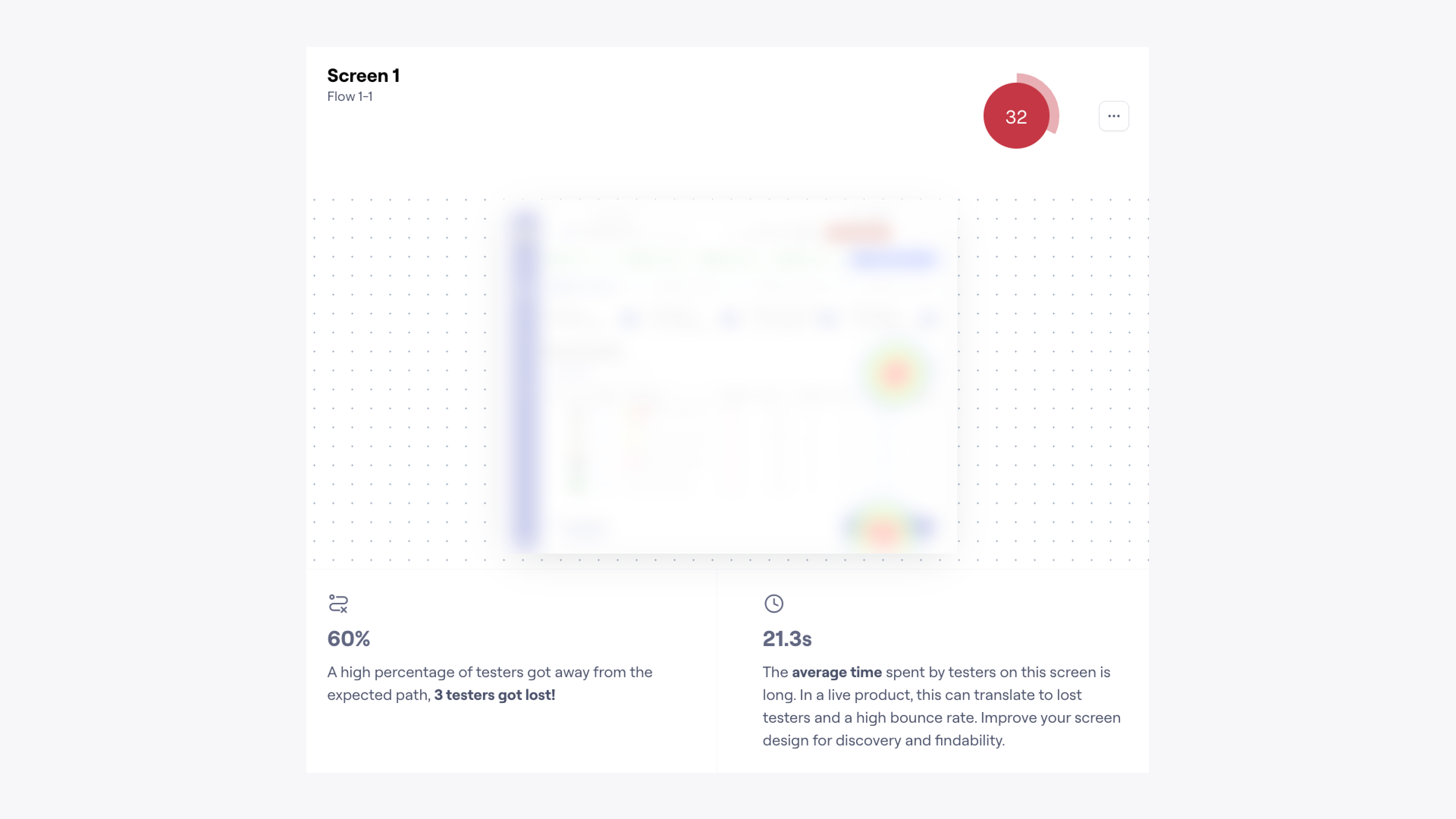
More than half of our users got lost 😅 The heat map also indicated that their mental model was heavily influenced by the current app, meaning early app guidance (either through screen walkthrough or physical sessions) would help to minimize expectation gap when the MVP is introduced.
This website was created with Figma Site. View design file.

Turning ambiguity to actionable UX materials for a Sales Force App
This case study details the discovery, analysis, and proposed design for a critical B2B application used daily by field sales teams to execute in-store tasks and manage their daily sales route.
All proprietary company names and product references have been generalized to maintain confidentiality.

UX Designer
Joined during Discovery Phase & led the definition of user journeys, wireframes, & user flows
UX Materials
The goal was to turn business requirements & operations into actionable UX materials
2024
I joined for 3 months, focusing on Discovery & Research Phase
NDA Protected
This case study is based on the Vinamilk Sales Automation App. Key details have been generalized or anonymized to comply with our Non-Disclosure Agreement. My contributions and the project's measurable outcomes are accurately represented.
Overview
A redesigned experience optimized for speed and accuracy
This initiative focused on redesigning a critical B2B application for Vinamilk’s salesforce: the Sales Automation App (SFA). This tablet app helps users track their performance, provides assistance during and after a sales visit, and plays a key role in tracking B2B orders.

Team scale
3 designers, each taking a different role during Discovery & Research
My role
UX designer
Contribution
Responsible for creating user journey, wireframe, user flows, and usability testing
Challenge
Bridging the sales knowledge gap
As non-sales members, the biggest hurdle was the steep learning curve. We had to quickly master the specific sales terms, critical metrics (KPIs), and operational processes that governed the field salesperson's day.
Based on gathered information & previously defined user personas, I worked with the team to define a comprehensive user journey.
Core User & Entity Definitions
Field Sales Representative (FSR)
An employee responsible for managing a dedicated portfolio of retail accounts. FSRs are organized into territory teams and are delegated to work closely with specific Channel Partners to ensure product availability and retail execution.
Channel Partner / B2B Inventory Hub
An authorized, regionally-organized B2B entity responsible for holding the company's product inventory and executing local product distribution. They serve as the fulfillment and inventory layer between the producer and the retail network.
Retail Outlet
A medium-to-large volume retailer that procures product inventory from the Channel Partner. The Retail Outlet is serviced by a designated FSR, who provides support for trade promotions, product advisory, and logs purchase orders for fulfillment by the Channel Partner.
Daily Call Plan
A structured, supervisor-defined sequence of required daily visits to a set list of Retail Outlets, determined by sales territory and resource capacity. Each visit requires the completion of business-specific mandatory activities (Key Visit Tasks), culminating in the primary goal of Order Capture.
Approach
Look at the problem from both business & users’ POV
From business goals to user realities, our initial focus was on building a shared understanding of the FSR’s world, their incentives, and their daily operational needs.
1/ Gather business context for Main Features
We worked with Product Owner to map out most important business knowledge, including: KPIs (metrics affecting paychecks), Daily Call Plan practicalities (how they are calculated & how business expects FSRs to follow & perform), Key Visit Tasks at outlets....
From which, we drafted a few key features that the MVP should have as the following table:
Main Features
Attendance & shift logging
Allows the FSR to digitally record the start and end of their workday, providing accurate data for field activity management and compliance tracking.
Performance dashboard
A high-level, visualized summary that displays the FSR’s Monthly Performance Indicators (KPIs), such as sales targets, quota attainment, and overall progress against goals.
Call cycle execution & geo-guidance
Presents the FSR with their Daily Call Plan (list of required outlet visits). Features real-time progress tracking (e.g., visited/order logged status) and integrates Geolocation Services for turn-by-turn route suggestions and accurate location verification for movement between outlets.
Key visit tasks (KVT) / Guided selling workflow
A structured, mandatory list of on-site activities presented sequentially at each outlet stop. This ensures compliance with merchandising standards, promotional execution, and provides a structured workflow to maximize sales opportunity capture.
Order capture & management
Facilitates the logging of customer purchase requests. This module distinguishes between On-Route Orders (placed during a scheduled visit) and Ad-Hoc/Off-Route Orders (placed for outlets not on the current day's planned itinerary), ensuring all sales demand is recorded.
Account management & setting
Enables the FSR to view, update, and maintain essential data pertaining to their assigned outlets. Also includes settings for personal app configuration and preferences.
2/ Conduct user surveys for User Personas
Our teammate (shout out to Toàn) conducted user surveys to understand the FSR’s perspective, identifying friction points, pain points, and opportunities for efficiency improvement in their current process.
I summarized and generalized the following personas based on the research insights.
The Experienced Performer
Quach Thi Ngoc Quyen
Age
32
Role
FSR
Experience
10 years
🎯
Goals
- Prioritize achieving KPIs and commission
- Focus on selling products that offer good sales incentives and managing the sales flow for large, long-term accounts.
🥰
Key Needs
- Accurate & timely KPIs data
- Quick data capture (orders, inventory, compliance)
- Reliable syncing and offline capability
😰
Top Pain Points
- Data entry burden: Having to log the same data (inventory, orders) multiple times across different systems/forms
- Lack of real-time data: Inventory/delivery history data is delayed
- Technical issues with current app: GPS check-in/out failures, especially when connectivity is poor
The Newcomer
Nguyen Van Tuan
Age
24
Role
FSR
Experience
1.5 years
🎯
Goals
- Focus on compliance with planned tasks and reporting requirements (daily checks, reports)
- Seek to learn and adhere to all sales processes and maximize daily call volume
🥰
Key Needs
- Clear, guided workflow for all tasks (KVT)
- Visibility into product inventory and promotional details
- Simple, quick entry for orders and post-visit reports
😰
Top Pain Points
- Information overload: Too many mandatory compliance tasks (KVTs) that disrupt sales flow
- Data discrepancy: Inventory/delivery history data isn't always accurate or current on the tablet.
- Technical issues with current app: App is prone to crashing, slow performance, and GPS check-in errors.
Discovery & research
Charting a 3-phase User Journey
From the gathered knowledge, I created a comprehensive, 3-phase user journey to clarify the FSR's emotional state, actions, and UX-focused goals (JTBDs) at every touchpoint.
The Context
Actor
Field Sales Representative (FSR)
Scenario
Executing the daily sequence of mandatory visits to assigned Outlets using the mobile app, with the goal of capturing orders
Expectations
Efficiently complete all scheduled visits, capture maximum order volume, ensure KVT compliance, and finish the day on time with minimal administrative overhead
The Experience
A. Planning & start of day
- Log attendance (Check-in)
Arrive at work, open app and clock in
- Review dashboard
Attend daily meeting with their supervisor. Recap on current performance & align on goals.
- View Daily call plan
View their day’s itinerary on the app
B. Visiting Outlets & execute KVTs
- Travel to location
Follow geo-guidance in app to navigate to outlets
- Execute KVTs
Arrive at outlets & execute Key Visit Tasks as guided in the app
- Answer Outlet’s questions
Assist Outlets with promotions & order-related issues
- Capture orders
Use the app to place the right SKU & promotions for outlets
C. Reviewing & closing the day
- Review Daily Summary (Orders placed, visits completed)
View Dashboard for quick performance review
- Log attendance (Check-out)
Clock out at the last Out let stop
View more
Mindset & Emotions
The Insights
Pain points & Opportunities
- Performance data is not available in the (current at the time) app→ O1: Add real-time data to Dashboard
- Geo-guidance is not accurate; call plan still requires manual re-sequencing→ O2: Improve geo-location accuracy & background sync speed
- GPS location accuracy is poor, forcing manual confirmation
- Too many mandatory tasks
- Compliance feels arbitrary
- Performance data is not available in the (current at the time) app→ O1: Add real-time data to Dashboard
Discovery & research
Defining JTBDs 👍
To keep the team focused on desired outcomes, I used JTBDs. JTBDs help shift the focus from ‘who’ the user is or ‘what’ they do, to ‘why’ they are doing it, and ultimately ‘what’ they want to achieve.
JTBDs
A. Planning & start of day
- Log attendance (Check-in)
👍 Check in successfully
- Review dashboard
👍 Know their current performance👍 Align on general goals👍 Know what can be done (overall and today) to meet KPIs
- View Daily call plan
→ Know their current performance
Know what can be done (overall and today) to meet KPIs
Have a good understanding of their retailers
Have a good understanding of SKUs and promotions
B. Visiting Outlets & execute KVTs
- Travel to location
👍 Arrive on time
- Execute KVTs
👍 Carry out each task quickly and successfully with little to no errors👍 Feel focused and guided throughout the process
- Answer Outlet’s questions
👍 Have an information source to refer back to if needed
- Capture orders
👍 See related products and quickly select to create order👍 Create order easily and successfully
C. Reviewing & closing the day
- Review Daily Summary (Orders placed, visits completed)
End the day successfully
→ Know if today’s goals are met
- Log attendance (Check-out)
👍 Check out successfully
Key UX Element
Wireflow as the starting point for design
As non-sales members, the biggest hurdle was the steep learning curve. We had to quickly master the specific sales terms, critical metrics (KPIs), and operational processes that governed the field salesperson's day.
Based on gathered information & previously defined user personas, I worked with the team to define a comprehensive user journey.
App structure wireflow
Design principles
The 'Why' Behind the Design
This wireframe for the uses several UX rationales, primarily focused on efficiency, task guidance, and motivational data display for the on-the-go Field Sales Representative (FSR).
1/ Prioritize and personalize
The FSR's goal in the morning is efficient alignment. The design strictly follows the FSR's required daily workflow, minimizing cognitive load and decision points.
2/ Motivational and goal-oriented dashboard
Displaying key performance indicators (KPIs) upfront motivates the FSR and provides necessary context for daily prioritization
3/ A guided, frictionless workflow
The design ensures the FSR follows the mandated Key Visit Tasks (KVT) workflow, which is critical for compliance and sales effectiveness (as identified in the persona)
Validation
Usability testing with Figma prototype & Maze
Based on the UX materials, we designed key UI flows and create interactive Figma prototypes for user testing. Due to time restriction (we could only test during FSRs’ working hour) and confidentiality reasons, we conducted an in-depth usability testing with 5 FSRs, each taking 1 hour on average to finish.
During the test, each FSR was assisted by one of our team members. We did not intervene during user’s interaction and only provided early guidance, taking note of their interactions, and later on asked a few follow-up questions.
We selected 5 FSRs based on their age & work experience at the company. The test purpose was to validate essential assumptions that the design was based on. Most of the UIs were brand-new and considerably different from the sales app they were using at the time.
Daily Call Plan: 100% success rate
All FSRs succeeded in navigating Daily Call Plan screen and select the asked Outlet to start a visit.
Simple KVTs: 100% success rate
As Key Visit Tasks flow was a newly introduced concept, we decided to test it in 5/7 prototypes. Results showed that the majority of users succeeded in completing required missions.
Confusion during Order Capture flow
Despite the success of previous flows, users encountered difficulties during the most important flow: capturing order. With only 60% success rate and 66.7% misclick rate, it was obvious to us that this specific flow would need a few more iterations before releasing
More than half of our users got lost 😅 The heat map also indicated that their mental model was heavily influenced by the current app, meaning early app guidance (either through screen walkthrough or physical sessions) would help to minimize expectation gap when the MVP is introduced.
This website was created with Figma Site. View design file.
Turning ambiguity to actionable UX materials for a Sales Force App
This case study details the discovery, analysis, and proposed design for a critical B2B application used daily by Field Sales Representatives to execute key visit tasks and capture order at Retailer Outlet.
All proprietary company names and product references have been generalized to maintain confidentiality.

UX Designer
Joined during Discovery Phase & led the definition of user journeys, wireframes, & user flows
UX Materials
The goal was to turn business requirements & operations into actionable UX materials
2024
I joined for 3 months, focusing on Discovery & Research Phase
NDA Protected
This case study is based on the Vinamilk Sales Automation App. Key details have been generalized or anonymized to comply with our Non-Disclosure Agreement. My contributions and the project's measurable outcomes are accurately represented.
Overview
A redesigned experience optimized for speed and accuracy
This initiative focused on redesigning a critical B2B application for Vinamilk’s salesforce: the Sales Automation App (SFA). This tablet app helps users track their performance, provides assistance during and after a sales visit, and plays a key role in tracking B2B orders.

Team scale
3 designers, each taking a different role during Discovery & Research
My role
UX designer
Contribution
Responsible for creating user journey, wireframe, user flows, and usability testing
Challenge
Turn sales knowledge into UX materials
As non-sales members, the biggest hurdle was the knowledge gap & the amount of information we had to process. It was critical we knew by heart specific sales terms, critical metrics (KPIs), and sales operational processes if we wanted to design an application that matched our user needs. The table below includes core terms as an example.
Core User & Entity Definitions
Field Sales Representative (FSR)
An employee responsible for managing a dedicated portfolio of retail accounts. FSRs are organized into territory teams and are delegated to work closely with specific Channel Partners to ensure product availability and retail execution.
Channel Partner / B2B Inventory Hub
An authorized, regionally-organized B2B entity responsible for holding the company's product inventory and executing local product distribution. They serve as the fulfillment and inventory layer between the producer and the retail network.
Retail Outlet
A medium-to-large volume retailer that procures product inventory from the Channel Partner. The Retail Outlet is serviced by a designated FSR, who provides support for trade promotions, product advisory, and logs purchase orders for fulfillment by the Channel Partner.
Daily Call Plan
A structured, supervisor-defined sequence of required daily visits to a set list of Retail Outlets, determined by sales territory and resource capacity. Each visit requires the completion of business-specific mandatory activities (Key Visit Tasks), culminating in the primary goal of Order Capture.
Approach
Look at the problem from both business & users’ POV
From business goals to user realities, our initial focus was on building a shared understanding of the FSR’s world, their incentives, and their daily operational needs.
1/ Gather business context for Main Features
We worked with Product Owner to map out most important business knowledge, including: KPIs (metrics affecting paychecks), Daily Call Plan practicalities (how they are calculated & how business expects FSRs to follow & perform), Key Visit Tasks at outlets....
From which, we drafted a few key features that the MVP should have as the following table:
Main Features
Attendance & shift logging
Allows the FSR to digitally record the start and end of their workday, providing accurate data for field activity management and compliance tracking.
Performance dashboard
A high-level, visualized summary that displays the FSR’s Monthly Performance Indicators (KPIs), such as sales targets, quota attainment, and overall progress against goals.
Call cycle execution & geo-guidance
Presents the FSR with their Daily Call Plan (list of required outlet visits). Features real-time progress tracking (e.g., visited/order logged status) and integrates Geolocation Services for turn-by-turn route suggestions and accurate location verification for movement between outlets.
Key visit tasks (KVT) / Guided selling workflow
A structured, mandatory list of on-site activities presented sequentially at each outlet stop. This ensures compliance with merchandising standards, promotional execution, and provides a structured workflow to maximize sales opportunity capture.
Order capture & management
Facilitates the logging of customer purchase requests. This module distinguishes between On-Route Orders (placed during a scheduled visit) and Ad-Hoc/Off-Route Orders (placed for outlets not on the current day's planned itinerary), ensuring all sales demand is recorded.
Account management & setting
Enables the FSR to view, update, and maintain essential data pertaining to their assigned outlets. Also includes settings for personal app configuration and preferences.
2/ Conduct user surveys for User Personas
Our teammate (shout out to Toàn) conducted user surveys to understand the FSR’s perspective, identifying friction points, pain points, and opportunities for efficiency improvement in their current process.
I summarized and generalized the following personas based on the research insights.
The Experienced Performer
Quach Thi Ngoc Quyen
Age
32
Role
FSR
Experience
10 years
🎯
Goals
- Prioritize achieving KPIs and commission
- Focus on selling products that offer good sales incentives and managing the sales flow for large, long-term accounts.
🥰
Key Needs
- Accurate & timely KPIs data
- Quick data capture (orders, inventory, compliance)
- Reliable syncing and offline capability
😰
Top Pain Points
- Data entry burden: Having to log the same data (inventory, orders) multiple times across different systems/forms
- Lack of real-time data: Inventory/delivery history data is delayed
- Technical issues with current app: GPS check-in/out failures, especially when connectivity is poor
The Newcomer
Nguyen Van Tuan
Age
24
Role
FSR
Experience
1.5 years
🎯
Goals
- Focus on compliance with planned tasks and reporting requirements (daily checks, reports)
- Seek to learn and adhere to all sales processes and maximize daily call volume
🥰
Key Needs
- Clear, guided workflow for all tasks (KVT)
- Visibility into product inventory and promotional details
- Simple, quick entry for orders and post-visit reports
😰
Top Pain Points
- Information overload: Too many mandatory compliance tasks (KVTs) that disrupt sales flow
- Data discrepancy: Inventory/delivery history data isn't always accurate or current on the tablet.
- Technical issues with current app: App is prone to crashing, slow performance, and GPS check-in errors.
Discovery & research
Charting a 3-phase User Journey
From the gathered knowledge, I created a comprehensive, 3-phase user journey to clarify the FSR's emotional state, actions, and UX-focused goals (JTBDs) at every touchpoint.
The Context
Actor
Field Sales Representative (FSR)
Scenario
Executing the daily sequence of mandatory visits to assigned Outlets using the mobile app, with the goal of capturing orders
Expectations
Efficiently complete all scheduled visits, capture maximum order volume, ensure KVT compliance, and finish the day on time with minimal administrative overhead
The Experience
A. Planning & start of day
- Log attendance (Check-in)
Arrive at work, open app and clock in
- Review dashboard
Attend daily meeting with their supervisor. Recap on current performance & align on goals.
- View Daily call plan
View their day’s itinerary on the app
B. Visiting Outlets & execute KVTs
- Travel to location
Follow geo-guidance in app to navigate to outlets
- Execute KVTs
Arrive at outlets & execute Key Visit Tasks as guided in the app
- Answer Outlet’s questions
Assist Outlets with promotions & order-related issues
- Capture orders
Use the app to place the right SKU & promotions for outlets
C. Reviewing & closing the day
- Review Daily Summary (Orders placed, visits completed)
View Dashboard for quick performance review
- Log attendance (Check-out)
Clock out at the last Out let stop
View more
Mindset & Emotions
The Insights
Pain points & Opportunities
- Performance data is not available in the (current at the time) app→ O1: Add real-time data to Dashboard
- Geo-guidance is not accurate; daily call plan might not match real-world possibility→ O2: Allow manual order visit for MVP. Need to optimize call plan better in next phases
- GPS location accuracy is poor, forcing manual confirmation→ O3: Improve geo-location accuracy & background sync speed
- Too many mandatory tasks→ O4: Streamline KVT completion with pre-filled defaults and quick-select buttons.
- Performance data is not available in the (current at the time) app→ O1: Add real-time data to Dashboard
Discovery & research
Defining JTBDs 👍
To keep the team focused on desired outcomes, I used JTBDs. JTBDs help shift the focus from ‘who’ the user is or ‘what’ they do, to ‘why’ they are doing it, and ultimately ‘what’ they want to achieve.
JTBDs
A. Planning & start of day
- Log attendance (Check-in)
👍 Check in successfully
- Review dashboard
👍 Know their current performance👍 Align on general goals👍 Know what can be done (overall and today) to meet KPIs
- View Daily call plan
👍 Have a good understanding of their outlets
B. Visiting Outlets & execute KVTs
- Travel to location
👍 Arrive on time
- Execute KVTs
👍 Carry out each task quickly and successfully with little to no errors👍 Feel focused and guided throughout the process
- Answer Outlet’s questions
👍 Have an information source to refer back to if needed
- Capture orders
👍 See related products and quickly select to create order👍 Create order easily and successfully
C. Reviewing & closing the day
- Review Daily Summary (Orders placed, visits completed)
👍 Know if today’s goals are met
- Log attendance (Check-out)
👍 Check out successfully
Key UX Element
Wireflow as the starting point for design
After establishing the principles, I collaborated with the team to design key screen wireframes and define the detailed User Flow, ensuring the system supported the new, high-efficiency workflow.
App structure wireflow
Design principles
The 'Why' Behind the Design
This wireframe for the uses several UX rationales, primarily focused on efficiency, task guidance, and motivational data display for the on-the-go Field Sales Representative (FSR).
1/ Prioritize and personalize
The FSR's goal in the morning is efficient alignment. The design strictly follows the FSR's required daily workflow, minimizing cognitive load and decision points.
2/ Motivational and goal-oriented dashboard
Displaying key performance indicators (KPIs) upfront motivates the FSR and provides necessary context for daily prioritization
3/ A guided, frictionless workflow
The design ensures the FSR follows the mandated Key Visit Tasks (KVT) workflow, which is critical for compliance and sales effectiveness (as identified in the persona)
Validation
Usability testing with Figma prototype & Maze
Based on the UX materials, we designed key UI flows and create interactive Figma prototypes for user testing. Due to time restriction (we could only test during FSRs’ working hour) and confidentiality reasons, we conducted an in-depth usability testing with 5 FSRs, each taking 1 hour on average to finish.
During the test, each FSR was assisted by one of our team members. We did not intervene during user’s interaction and only provided early guidance, taking note of their interactions, and later on asked a few follow-up questions.
We selected 5 FSRs based on their age & work experience at the company. The test purpose was to validate essential assumptions that the design was based on. Most of the UIs were brand-new and considerably different from the sales app they were using at the time.
Daily Call Plan: 100% success rate
All FSRs succeeded in navigating Daily Call Plan screen and select the asked Outlet to start a visit.
Simple KVTs: 100% success rate
As Key Visit Tasks flow was a newly introduced concept, we decided to test it in 5/7 prototypes. Results showed that the majority of users succeeded in completing required missions.
Confusion during Order Capture flow
Despite the success of previous flows, users encountered difficulties during the most important flow: capturing order. With only 60% success rate and 66.7% misclick rate, it was obvious to us that this specific flow would need a few more iterations before releasing
More than half of our users got lost 😅 The heat map also indicated that their mental model was heavily influenced by the current app, meaning early app guidance (either through screen walkthrough or physical sessions) would help to minimize expectation gap when the MVP is introduced.
This website was created with Figma Site. View design file.